A sensor should lead to a useful decision
Temperature and humidity sensors are among the simplest smart-home devices to install.
They’re also among the easiest to buy without knowing what you’re going to do with the data.
Before choosing one, ask:
Do I simply need measurements?
Do I want a local display?
Do I want controls in the room?
Do I need additional environmental information?
What will Home Assistant do with the measurement?
Those questions quickly separate products that otherwise look similar.
Aqara Temperature & Humidity Sensor T1
The T1 suits the classic sensor role.
It’s compact and designed to provide environmental measurements rather than become a visible room interface.
That can make it useful for:
- bedrooms;
- cupboards/storage areas;
- indoor climate monitoring;
- automation inputs;
- rooms where a display isn’t required.
If the goal is simply:
Measure → send information to Home Assistant → automate
then a compact sensor can be exactly what you need.
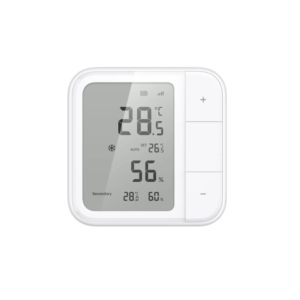
Aqara Climate Sensor W100
The W100 serves a broader user-interface role.
Rather than hiding a sensor somewhere in the room, a display-oriented device gives occupants useful information locally and can support interaction depending on the chosen ecosystem/configuration.
That makes it more suitable where somebody in the room should be able to see the environmental state instead of relying solely on a Home Assistant dashboard.
This is an important buying distinction.
The W100 isn’t simply “a more expensive T1.”
It serves a different job.
Sonoff AirGuard
Sonoff’s AirGuard range gives Hive another type of environmental-monitoring option.
Depending on the specific AirGuard model, the focus can extend beyond basic temperature/humidity information into richer environmental monitoring.
That can make an AirGuard product more appropriate where a visible environmental monitor is desirable rather than a discreet automation sensor.
Again, compare the exact model and measurements it provides before buying.
What can Home Assistant do with temperature?
Displaying the number is only the beginning.
Temperature can become an automation condition.
For example:
Room becomes warmer than the chosen threshold + room occupied → adjust compatible climate equipment.
Or:
Temperature enters an unusual range → send a notification.
The actual threshold should reflect the room and use case rather than being copied from a generic automation tutorial.
What can you do with humidity?
Humidity information can be particularly useful in bathrooms and other moisture-prone areas.
Instead of running ventilation according to a fixed timer alone, an appropriate system can use environmental information as one of the inputs.
For example:
Humidity rises substantially relative to normal conditions → operate appropriate ventilation.
Then:
Humidity returns to the chosen condition → stop the ventilation after appropriate logic.
That is more responsive than assuming every shower lasts exactly the same amount of time.
Sensor placement matters
A sophisticated sensor in the wrong place produces misleading information.
Avoid locations that don’t represent the room well, such as immediately next to:
- heaters;
- air-conditioning outlets;
- open windows;
- direct sunlight;
- steam sources unless intentionally measuring them.
The goal is to measure the environment relevant to the automation.
Which type should I choose?
Choose a compact sensor such as Aqara T1 when:
You primarily need environmental data.
You don’t need a display.
The sensor is an automation input.
Consider Aqara W100 when:
You want environmental information visible in the room.
A local interface is useful.
Its supported connectivity/features fit your Home Assistant architecture.
Consider Sonoff AirGuard when:
You want a more visible environmental-monitoring device.
The exact AirGuard model provides the measurements you need.
You want those measurements available as part of a broader compatible smart-home system.
Don’t buy by brand alone
Aqara versus Sonoff isn’t the useful comparison here.
The useful comparison is:
small hidden sensor vs room interface vs richer environmental monitor.
Once you know which role you need, choosing the product becomes much easier.
FAQ
Can Home Assistant use temperature and humidity sensors?
Yes, where the specific sensor has a supported integration route.
Do I need a display?
No. If Home Assistant is consuming the measurements for automation, a local display may be unnecessary.
Where should I install the sensor?
Place it where it can reasonably represent the conditions relevant to the automation, avoiding obvious local heat, cooling or moisture sources unless those are intentionally being measured.
Can humidity automate a bathroom fan?
Potentially, when appropriate sensing, control equipment and automation logic are installed.
Which sensor is best?
There isn’t one universal winner. T1, W100 and AirGuard-style devices serve different roles. Choose based on the information and interface required.
Next steps
Shop Environmental Sensors Explore Home Assistant South Africa Discuss Your Project